Caching Strategies with Redis in .NET Applications
Caching has a reputation for being simple: store the result, skip the expensive work next time. In practice, it's one of the areas where a well-intentioned shortcut most often turns into a subtle production bug, usually involving stale data showing up somewhere a user notices before an engineer does. Redis has been my default caching layer across several platforms, and the patterns below are the ones that have kept it a genuine performance win instead of a source of confusing bugs.
Cache-aside: the pattern I reach for most
csharp
public async Task<Customer> GetCustomerAsync(Guid id)
{
    var cached = await _cache.GetStringAsync($"customer:{id}");
    if (cached is not null)
        return JsonSerializer.Deserialize<Customer>(cached);

    var customer = await _repository.GetByIdAsync(id);
    await _cache.SetStringAsync($"customer:{id}", JsonSerializer.Serialize(customer),
        new DistributedCacheEntryOptions { AbsoluteExpirationRelativeToNow = TimeSpan.FromMinutes(10) });

    return customer;
}
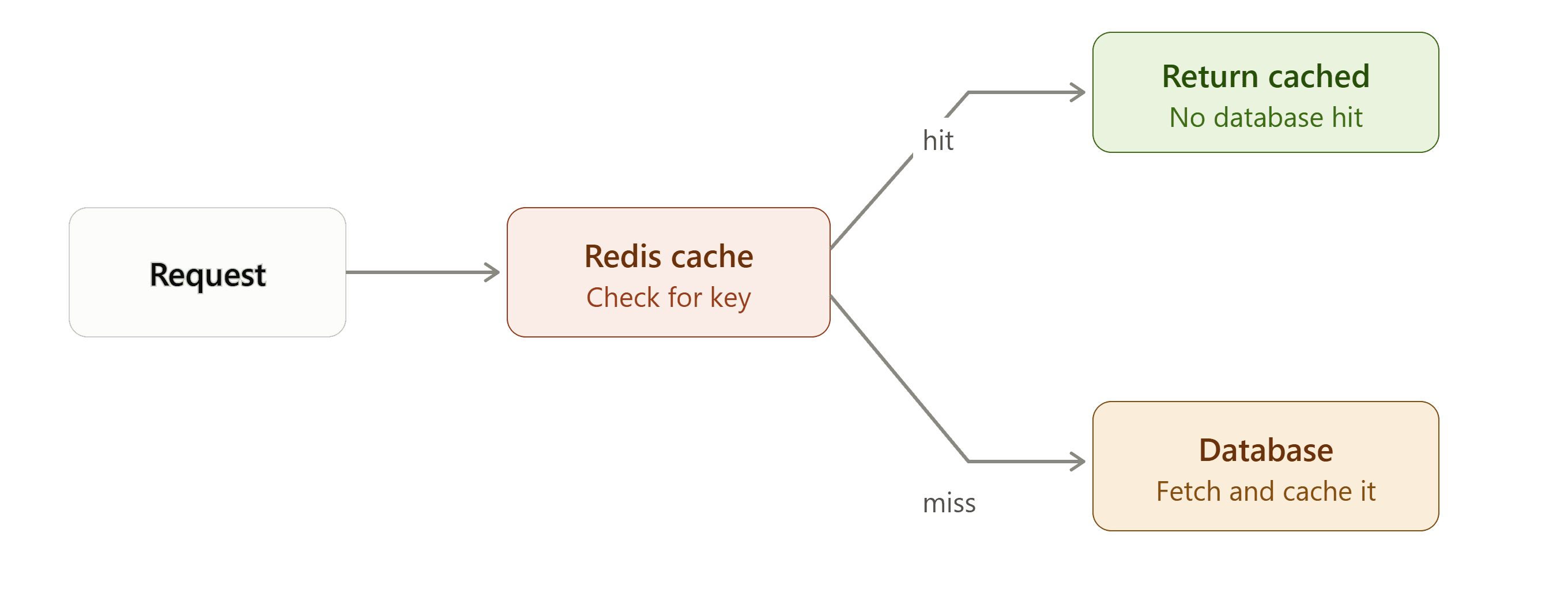
Check the cache first, fall back to the source of truth on a miss, populate the cache for next time. It's simple, and simple is a feature when a dozen developers will touch this code over the life of a project.
Expiration is a business decision, not a technical afterthought
The single most common caching mistake I see isn't a missing cache, it's a cache with no thought put into how long the data should live. Reference data that rarely changes, product categories, country lists, can safely live in cache for hours. A customer's account balance cannot, and treating both the same way, either both cached aggressively or both cached cautiously, gets one of them wrong every time.
csharp
var expiration = category switch
{
    CacheCategory.ReferenceData => TimeSpan.FromHours(6),
    CacheCategory.UserProfile => TimeSpan.FromMinutes(15),
    CacheCategory.FinancialBalance => TimeSpan.FromSeconds(30),
    _ => TimeSpan.FromMinutes(5)
};
I ask a specific question for every cached value: what's the actual cost of this being stale for the expiration window I've chosen? For financial data, that cost is high and the window should be short or nonexistent. For a list of insurance product categories, the cost is close to zero.
Cache invalidation on write, not just expiration
Waiting for a TTL to expire is fine for data where brief staleness is acceptable. It's not fine when a user just updated their own profile and immediately sees the old version reflected back at them. Explicit invalidation on write closes that gap:
csharp
public async Task UpdateCustomerAsync(Customer customer)
{
    await _repository.SaveAsync(customer);
    await _cache.RemoveAsync($"customer:{customer.Id}");
}
This is a small addition that prevents one of the more common and more visible caching bugs: a user makes a change, refreshes, and sees their old data staring back at them.
The thundering herd problem
When a popular cache key expires, a burst of concurrent requests can all miss the cache simultaneously and all hammer the database at once to repopulate it, briefly recreating exactly the load problem the cache exists to prevent. On a high-traffic ticketing-adjacent platform, this was a real issue during popular event releases. Locking around cache population, so only one request repopulates the cache while others wait briefly for that result, solves it:
csharp
public async Task<Customer> GetCustomerAsync(Guid id)
{
    var cached = await _cache.GetStringAsync($"customer:{id}");
    if (cached is not null) return JsonSerializer.Deserialize<Customer>(cached);

    using var lockHandle = await _lockProvider.AcquireLockAsync($"lock:customer:{id}", TimeSpan.FromSeconds(5));
    // re-check cache after acquiring lock, another request may have already populated it
    cached = await _cache.GetStringAsync($"customer:{id}");
    if (cached is not null) return JsonSerializer.Deserialize<Customer>(cached);

    var customer = await _repository.GetByIdAsync(id);
    await _cache.SetStringAsync($"customer:{id}", JsonSerializer.Serialize(customer));
    return customer;
}
Distributed cache, not per-instance memory cache, in a multi-instance deployment
IMemoryCache is fast because it lives in-process, but that's also its limitation: in a load-balanced deployment with multiple instances, each instance has its own separate cache, and invalidating on one instance does nothing for the others. Redis, as a shared distributed cache, keeps every instance seeing the same data. I use IMemoryCache only for genuinely instance-local concerns, and Redis for anything that needs to be consistent across a fleet of running instances.
What I don't cache
Not everything benefits from caching. Data that changes on nearly every read, or data where correctness matters more than the milliseconds saved, sometimes just isn't worth the invalidation complexity. Caching is a tool for a specific problem, expensive or frequent reads of relatively stable data, not a default applied everywhere out of habit.
The real discipline
Redis makes caching technically easy. What actually keeps a cache trustworthy is being deliberate about expiration per data type, invalidating on write where staleness is visible to users, and thinking through concurrent access patterns before they become a production incident. The technology is the easy part.